
Welcome to AI-Radar’s 2026 Definitive Editorial on Enterprise Automation.
The era of manual data entry is officially dead. In the modern business ecosystem, workflow orchestration has transitioned from a tactical convenience to a foundational pillar of digital infrastructure. But as of 2026, the global market for automation has bifurcated into distinct philosophical camps, leaving technical leaders and operations managers staring at a complex triad of choices: Zapier, Make.com, and n8n.
If you've ever found yourself debugging a JSON payload at 2:00 AM or staring at a software bill that looks more like a mortgage payment, you already know that choosing the right automation platform is not a trivial matter. It is a decision that will shape your operational cost structure, your data security, and your ability to leverage artificial intelligence for years to come.
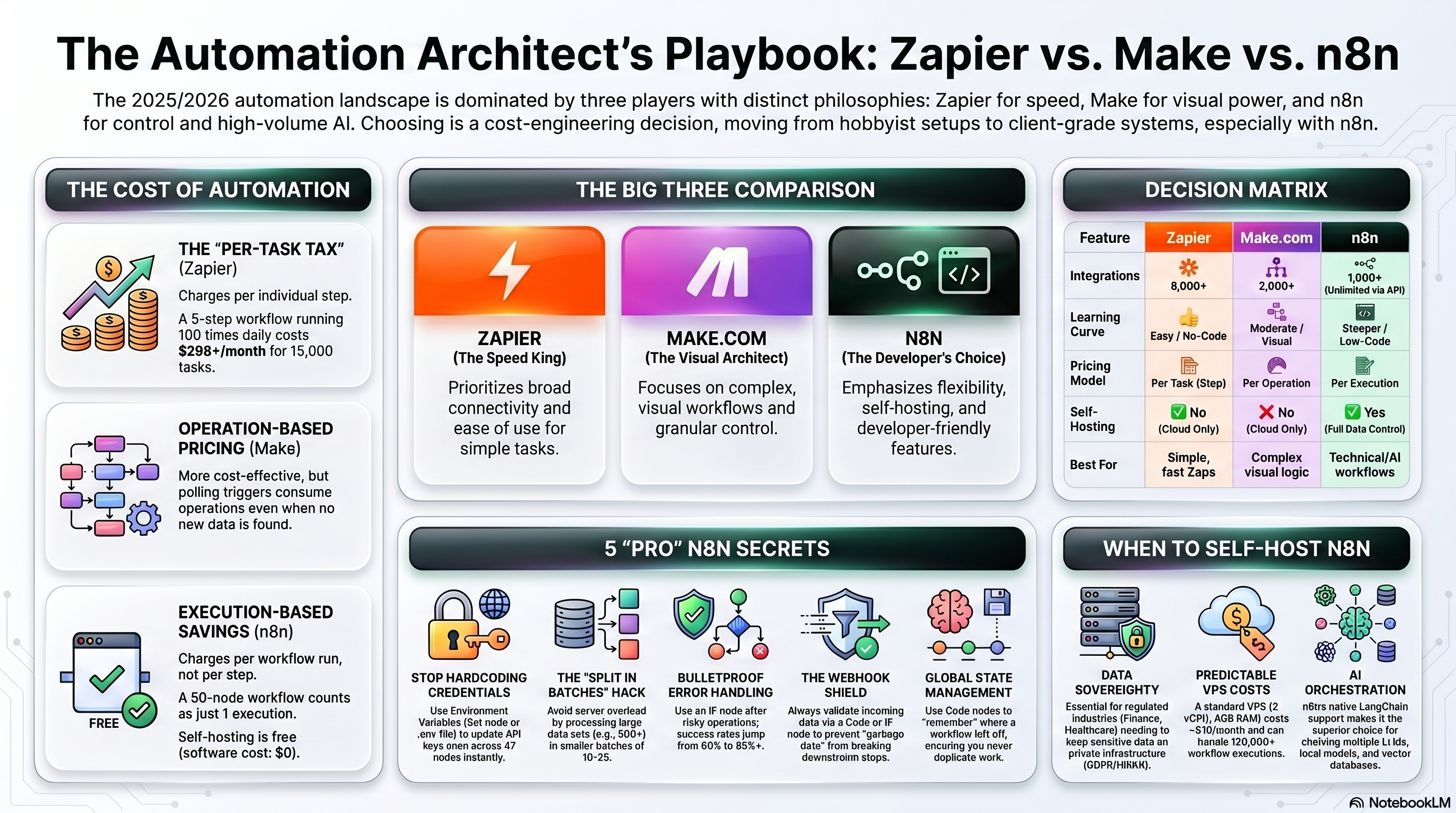
In this comprehensive editorial, we will dissect these three titans of automation. We’ll explore their pros, cons, when, where, and why to use them—and, most importantly, whether they are actually worth the price tag they carry. Let's automate!
--------------------------------------------------------------------------------
- The Architectonics of Automation: Philosophical Foundations
The fundamental divergence between Zapier, Make, and n8n is rooted in their target user personas and architectural intent. They are not simply interchangeable tools; they represent entirely different philosophies on how work should be done.
Zapier (The Integration Giant): Zapier was conceived as a democratizing force. Its mission is to allow non-technical business users—marketers, sales reps, and HR professionals—to connect disparate SaaS applications without ever bothering the IT department. It uses a linear, "Trigger-Action" model that intentionally hides the ugly realities of API responses and authentication headers, providing a true "plug-and-play" experience.Make.com (The Visual Orchestrator): Formerly known as Integromat, Make occupies the strategic middle ground. It caters to "power users" and operational specialists by providing a drag-and-drop canvas that mimics a logical flowchart. Make’s philosophy is built on the premise that business processes are rarely linear and require a visual medium to manage branching paths, loops, and complex data transformations.n8n (The Developer-First Powerhouse): n8n represents the "fair-code" open-source frontier. It treats automation as a code-level orchestration layer that just happens to possess a visual interface. Built for developers, GTM (Go-To-Market) engineers, and technical RevOps teams, n8n offers a node-based architecture providing complete visibility into underlying data structures. Crucially, it can be self-hosted, allowing organizations to maintain absolute data sovereignty.
Structural and Philosophical Comparison
| Feature | Zapier | Make.com | n8n |
|---|---|---|---|
| Primary Philosophy | Accessibility & rapid deployment | Visual logic & transparency | Control, code & technical depth |
| Target User | Non-technical business users | Ops teams & power users | Developers & engineers |
| Workflow Logic | Linear (Trigger-Action Zaps) | Canvas-based (Scenarios) | Node-based (Workflows) |
| Integrations | 8,000+ (Broad but shallow) | 1,500 - 3,000+ (Deep & granular) | 400+ Native (Highly extendable via code) |
| Technical Barrier | Low (Intuitive UI) | Medium (Logical thinking required) | High (DevOps, JS/Python required) |
--------------------------------------------------------------------------------
- The Age of AI: Deterministic vs. Agentic Workflows
The defining shift in the automation landscape transitioning into 2026 has been the integration of Artificial Intelligence. All three platforms now connect to OpenAI, Anthropic, and Google Gemini, but they handle autonomous reasoning very differently.
Zapier: App-Centric Agents & Copilot Zapier’s AI strategy revolves around "Zapier Central" and natural language creation. A non-technical user can simply type, "When I get a new lead from Facebook, summarize their LinkedIn profile and email me," and the AI Copilot builds the Zap. Furthermore, Zapier Agents can autonomously execute multi-app tasks across its massive 8,000+ app ecosystem. However, they remain largely deterministic, executing a series of steps in a chain rather than engaging in deep, persistent reasoning.
Make: Workflow-Embedded AI Make introduced "Maia," an AI assistant that builds scenarios from natural language and actually explains the logic as it builds. In Make, AI modules are treated as standard nodes within a scenario. The primary advantage here is visual transparency. In an agentic workflow, understanding why an AI took a specific action is difficult; Make’s visual canvas makes agent behavior significantly easier to audit and debug than Zapier’s linear list.
n8n: Framework-Level Agents If you want to build true, autonomous AI agents, n8n is widely regarded as being six months ahead of the competition. The n8n 2.0 update introduced native LangChain integration, providing over 70+ dedicated AI nodes. Instead of just passing data to an LLM, n8n supports "AI Agent Loops". You can give an agent node a "Toolbox" (e.g., an HTTP request, a Google Search node, a vector database) and the agent will independently reason, decide which tool to use, check the result, and iterate until the goal is achieved. With persistent memory backends (Redis/Postgres) and Retrieval-Augmented Generation (RAG) pipelines, n8n is the undisputed king of complex AI orchestration.
--------------------------------------------------------------------------------
- Technical Capabilities: Breaking Down the Machinery
Automation is only as good as its ability to handle edge cases, bad data, and inevitable API failures.
Data Manipulation and Logic: Zapier is optimized for simple, A-to-Z data transfers. While it has introduced features like "Paths" and "Looping," these are often gated behind premium tiers and can become incredibly unwieldy when dealing with sophisticated logic or arrays. Make.com shines with its native "Iterators" and "Aggregators," designed specifically to handle large datasets and arrays. You can easily split a CRM export into individual line items, process each through a different logic branch, and aggregate the results into a single Slack report. n8n treats data as first-class objects. Its "Code Node" fully supports JavaScript and Python, allowing engineers to write custom algorithms, manipulate complex JSON payloads, or even install external npm packages to handle highly specific edge cases that visual builders simply cannot process.
Error Handling (Because things will break): When an API returns a 500 error, production systems fail silently if error handling is inadequate. Zapier’s error handling is relatively basic, often requiring manual intervention to restart a failed Zap, though premium tiers offer "Autoreplay". Make offers dedicated "Error Handler" modules (Break, Retry, Ignore, Commit) that let you visually route failed operations to alternative paths. n8n offers enterprise-grade error handling. It allows for "Error Trigger" workflows that capture metadata of a failed execution (node name, specific error message) and routes it into a dedicated "Self-Healing" workflow with configurable backoff strategies.
--------------------------------------------------------------------------------
- Pricing, Economics, and the TCO: Are They Worth It?
The most contentious aspect of the automation market is pricing. As organizations scale, the "sticker shock" of usage-based billing is often the primary driver for platform migration. Let's examine the math.
Zapier: The "Per-Task Tax"
Zapier bills by the "Task," which is defined as any successful action performed by a Zap. If you have a 10-step Zap, every single execution consumes 9 tasks. This creates a "Complexity Penalty": as you build more sophisticated workflows to handle business edge cases, your costs rise exponentially. For a mid-size operations team running 50,000 tasks per month, Zapier can easily cost between $448 and $820 monthly. Verdict: Worth it for the time saved by non-technical teams, but prohibitively expensive at scale.
Make: The Operations Middle-Ground
Make utilizes "Operations," where every module execution consumes a credit. While it sounds similar to Zapier, Make's pricing is significantly more aggressive and friendly to the user. A workflow running 10,000 operations per month costs approximately $16 on Make, compared to over $200 on Zapier. The Catch: Polling triggers consume operations even when no new data is found. A workflow polling an inbox every 5 minutes burns through nearly 9,000 operations a month doing absolutely nothing. Verdict: The optimal "Power-to-Price" balance in the market.
n8n Cloud: The Complexity-Neutral Model
n8n Cloud bills based on "Executions"—one complete run of a workflow from trigger to end, regardless of whether it contains 5 nodes or 500. A lead enrichment pipeline that branches through five data sources costs 1 execution in n8n, but 5+ tasks/operations on competitors. The Catch: The "Polling Trap." Just like Make, n8n Cloud charges an execution for polling. A single polling workflow running every 5 minutes will generate 8,640 executions a month, entirely wiping out the €24/mo Starter Plan's 2,500 execution limit before any actual work is done.
n8n Self-Hosted: The "Free" Reality Check
n8n’s Community Edition is free to self-host, offering unlimited executions and workflows. But is it really free? As the old tech adage goes: "Free as in a free puppy, not free as in free beer". To run n8n in production, you need a VPS (Virtual Private Server), a managed database (PostgreSQL), SSL certificates, and security firewalls. Infrastructure costs typically range from $40 to $120 a month. But the true hidden cost is DevOps labor. You are responsible for updates, security patching, and disaster recovery. If your workflow crashes because the "Execution History Footgun" filled up your server's disk space with old logs, that is your problem to fix. DevOps labor can easily add an implied $800 to $2,000 to your monthly Total Cost of Ownership (TCO). Verdict: Incredibly cost-effective if you already have a technical team and are running massive volumes (50,000+ executions/month). Otherwise, you are trading SaaS subscription costs for hidden operational headaches.
Monthly TCO Comparison Table (At 50,000 Executions/Tasks)
| Expense Category | Zapier (Team) | Make.com (Pro/Teams) | n8n Cloud (Pro) | n8n Self-Hosted |
|---|---|---|---|---|
| Software License | ~$500 - $800+ | ~$55 - $110 | ~$120 - $250 | $0 |
| Server/Infra Cost | $0 | $0 | $0 | $40 - $120 |
| Security/DB Cost | $0 | $0 | $0 | $40 - $175 |
| DevOps Labor | $0 | $0 | $0 | $800 - $2,000 (implied) |
| Total TCO / Month | $500+ | $55 - $110 | $120 - $250 | 880+(or 100 if DIY) |
--------------------------------------------------------------------------------
- When, Where, and Why to Use Them
There is no single "best" automation platform; there is only the best platform for your specific context.
When to Choose Zapier
When: You need rapid deployment and your team consists of non-technical business users (Marketers, Sales, HR).Where: Edge automations, simple lead routing (e.g., Facebook Lead Ads -> HubSpot -> Slack notification).Why: Time is money. If Zapier saves a $50/hr employee 10 hours a month, the $100 subscription fee is an immediate, positive ROI. It boasts over 8,000 integrations, meaning you will rarely face a "Sorry, app not found" error.
When to Choose Make.com
When: Your workflows involve complex branching, loops, or heavy data transformation, and you are conscious of budget scaling.Where: Core operational workflows, e-commerce order synchronization (Shopify -> Inventory -> Accounting), and multi-step client onboarding.Why: It offers the most intuitive visual interface for complex scenarios. Make is the perfect sweet spot for mixed teams that need power but don't want to maintain a server.
When to Choose n8n
When: You have dedicated developer resources, you are building advanced AI agents, or you are processing massive data volumes.Where: Back-end data pipelines, custom legacy system integrations, and environments requiring strict compliance (Healthcare/HIPAA, Finance/GDPR).Why: Data sovereignty. By self-hosting, your data never leaves your company's firewall. Furthermore, n8n gives you code-level access (JavaScript/Python) to manipulate payloads in ways visual builders simply cannot.
--------------------------------------------------------------------------------
- Pros and Cons: The Executive Summary
| Platform | The Good (Pros) | The Bad (Cons) |
|---|---|---|
| Zapier | • Easiest learning curve • Massive 8,000+ app ecosystem • Enterprise-grade managed security • Built-in Interfaces & Tables |
• Punishing "Per-Task" pricing at scale • Rigid linear workflow logic • Limited advanced data transformation • No self-hosting option |
| Make.com | • Beautiful, powerful visual canvas • Excellent value-to-cost ratio • Native iterators/routers for arrays • Robust error-handling paths |
• Steeper learning curve than Zapier • Smaller integration library (1,500+) • Polling triggers burn through credits • No self-hosting for compliance |
| n8n | • Ultimate control & data privacy • Unlimited scale when self-hosted • Native LangChain & AI Agent loops • Full JS/Python code node support |
• Steep learning curve (DevOps needed) • "Hidden costs" of server maintenance • Smaller native app library (400+) • Community-driven support (unless paid) |
--------------------------------------------------------------------------------
- The Strategic Maturity Arc: Evolving Your Stack
In 2026, mature enterprises rarely rely on a single automation tool. Instead, they follow a strategic maturity arc, eventually deploying a hybrid ecosystem:
Stage 1: The Quick Win (Zapier). Startups and small teams use Zapier to gain momentum. Setup speed is far more valuable than cost optimization.Stage 2: The Complexity Wall (Make.com). As operations mature, the "Zapier Tax" becomes painful. Teams migrate core operational flows to Make.com to leverage complex branching and reduce monthly software burn.Stage 3: The Infrastructure Shift (n8n). When volume reaches hundreds of thousands of executions, or when data privacy dictates that payloads cannot pass through third-party servers, technical teams migrate heavy backend pipelines to self-hosted n8n instances.
The 2026 Enterprise Best Practice: Use Zapier for "Edge Automations" built by marketing teams. Use Make.com for "Core Operational Workflows" managed by RevOps. Use n8n for "Backend AI Pipelines" governed by your engineering team.
Conclusion: Are They Worth the Cost?
The value of an automation platform is a calculation of its Total Cost of Ownership (TCO) against the human capital it liberates.
Yes, Zapier is worth it if you value speed and simplicity over all else. Yes, Make.com is worth it if you are a visual thinker managing complex logic on a budget. Yes, n8n is profoundly worth it if you have the technical chops to wield it, representing the ultimate gateway to autonomous AI orchestration and unlimited scalability.
Automation is no longer just about connecting App A to App B. It is a strategic bet on how your business intends to scale its cognitive labor in an AI-driven economy. Choose the platform that aligns with your technical reality today, but plan for the intelligence you will need tomorrow.


💬 Commenti (0)
🔒 Accedi o registrati per commentare gli articoli.
Nessun commento ancora. Sii il primo a commentare!