
Welcome to the AI-Radar Editor's Desk.
I'm thrilled to present our latest in-depth analysis on the beating heart of modern software engineering.
If you had told me in 2023 that by 2026 developers would be spending their days "orchestrating" AI agents instead of furiously typing boilerplate code, I would have laughed. But here we are. Today, a staggering 42% of all new code is AI-assisted, and 85% of developers regularly rely on AI tools. We've moved past the era of glorified autocomplete. We are now firmly in the era of the agentic IDE, where tools don't just predict the next line of code, but autonomously read codebases, execute terminal commands, and draft complex pull requests.
But this revolution has generated a new crisis for both developers and IT leaders: The VS Code Dilemma.
Do you abandon your carefully curated Visual Studio Code environment for a sleek, AI-native fork like Windsurf or Cursor? Or do you bolster your existing VS Code setup with powerful "bring-your-own-key" (BYOK) extensions like Cline, Roo Code, and Continue?
In this comprehensive editorial, we put the main contenders under the microscope—Continue, Cline, Roo-Code, and Codeium (Windsurf). We'll explore their pros and cons, dissect their architectural philosophies, and, most importantly, analyze them through an Enterprise and On-Premise lens. Because let's face it: giving an autonomous AI full access to your proprietary code in healthcare or defense is a bit like giving a child a power drill—the job gets done quickly, but you really have to keep an eye on it.
Grab your coffee. Let's crown a king.
The Paradigm Shift: From Copilot to Autonomous Agents
Before dissecting the tools, we need to understand the battlefield. The market has fragmented into distinct philosophies:
Native AI IDEs (The Forks): Tools like Windsurf (by Codeium) that "fork" the VS Code architecture to rebuild the editor with AI at its core. They offer deep, native integrations with the editor but force you to migrate to a new application.
BYOK Extensions: Tools like Cline, Roo Code, and Continue. They live in your existing VS Code sidebar as extensions. You bring your own API keys, keep your current editor, and retain absolute control over the models you use.
The friction between these two approaches is the defining debate of 2026. Let's meet the contenders.
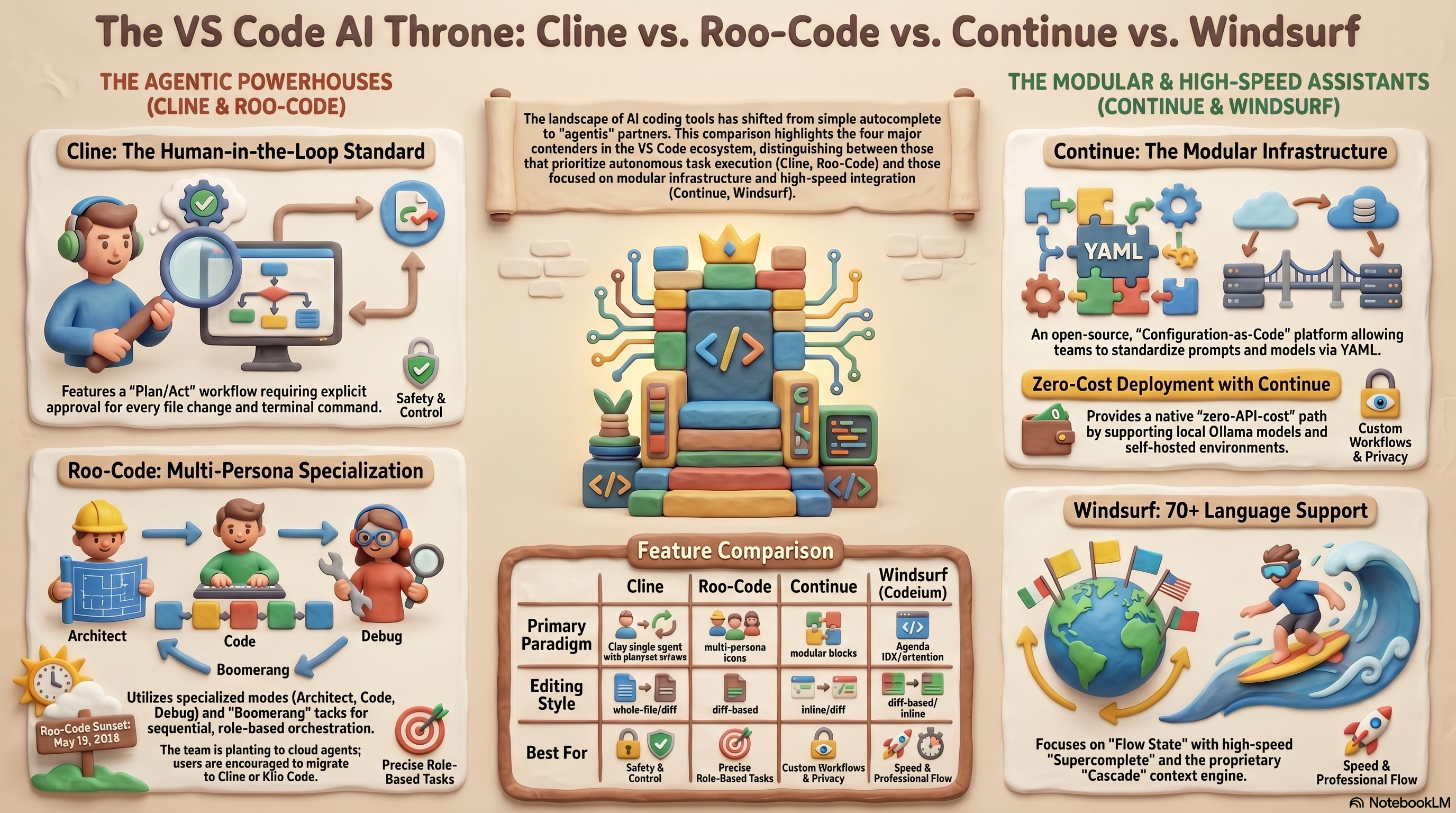
- Cline: The Thoughtful (and Transparent) Collaborator
Cline (formerly Claude Dev) is the reigning champion of the open-source extension world, boasting over 5 million installations. It functions as a VS Code sidebar extension and relies entirely on a BYOK model, meaning you insert your own API keys (Anthropic, OpenAI, Gemini, DeepSeek, or local Ollama).
The Philosophy: Human-in-the-Loop
Cline's architecture is based on a "Plan and Act" methodology. It doesn't just proceed "blindly" into your repository. It analyzes the workspace, proposes a detailed plan, and explicitly awaits your approval before writing to a file or executing a terminal command.
The Pros
Unmatched Extensibility: Cline pioneered the adoption of the Model Context Protocol (MCP). Through the MCP Marketplace, you can extend Cline's capabilities to fetch Jira tickets, manage AWS EC2 instances, or query Postgres databases.
Maximum Model Flexibility: Since you're not tied to a vendor's subscription, you can use Claude 3.7 Sonnet for complex architectures and switch to an inexpensive local model for basic refactoring.
Privacy by Default: Your code goes exactly where your API key tells it to go. There's no intermediary collecting your telemetry.
The Cons
The Cost Trap: Because Cline provides deep context to the LLM for every action, it is incredibly token-hungry. Intensive users can accidentally burn through $50 to $200 a month in API costs.
No Inline Autocomplete: Cline is an agent, not an autocomplete engine. If you want that magical "press Tab to finish my thought" experience, you'll need to pair it with another tool.
The "Let's Go Nuclear" Factor: Sometimes, if the context window gets confused, Cline might propose a massive, unrequested rewrite of your state management logic. You need to keep it on a short leash.
- Roo Code: The Multi-Persona Innovator (and Survivor)
Roo Code began its life as a community fork of Cline, built to address some of the original tool's limitations. It quickly gained a huge cult following, surpassing 1.5 million installations, by introducing Custom Modes.
The Philosophy: Role-Based Execution
Instead of a generic agent trying to do everything, Roo Code divides its intelligence into specialized personas:
Architect: Plans complex changes without touching a single line of code.
Code: Executes diffs.
Debug: Diagnoses problems and isolates root causes.
Ask: Explains functionality without risking accidental modifications.
The Pros
Targeted Diff-Based Changes: Unlike early versions of Cline that struggled with entire file replacements, Roo Code uses optimized diff-based editing, which reduces






💬 Comments (0)
🔒 Log in or register to comment on articles.
No comments yet. Be the first to comment!